Identity Integrations

MFA for SSO, IAM and PAM

Keep your identity provider, SSO and PAM tools as they are. TokenCore™ adds phishing-resistant MFA to them as a FIDO2 security key, with a fingerprint check on the logins that matter most.

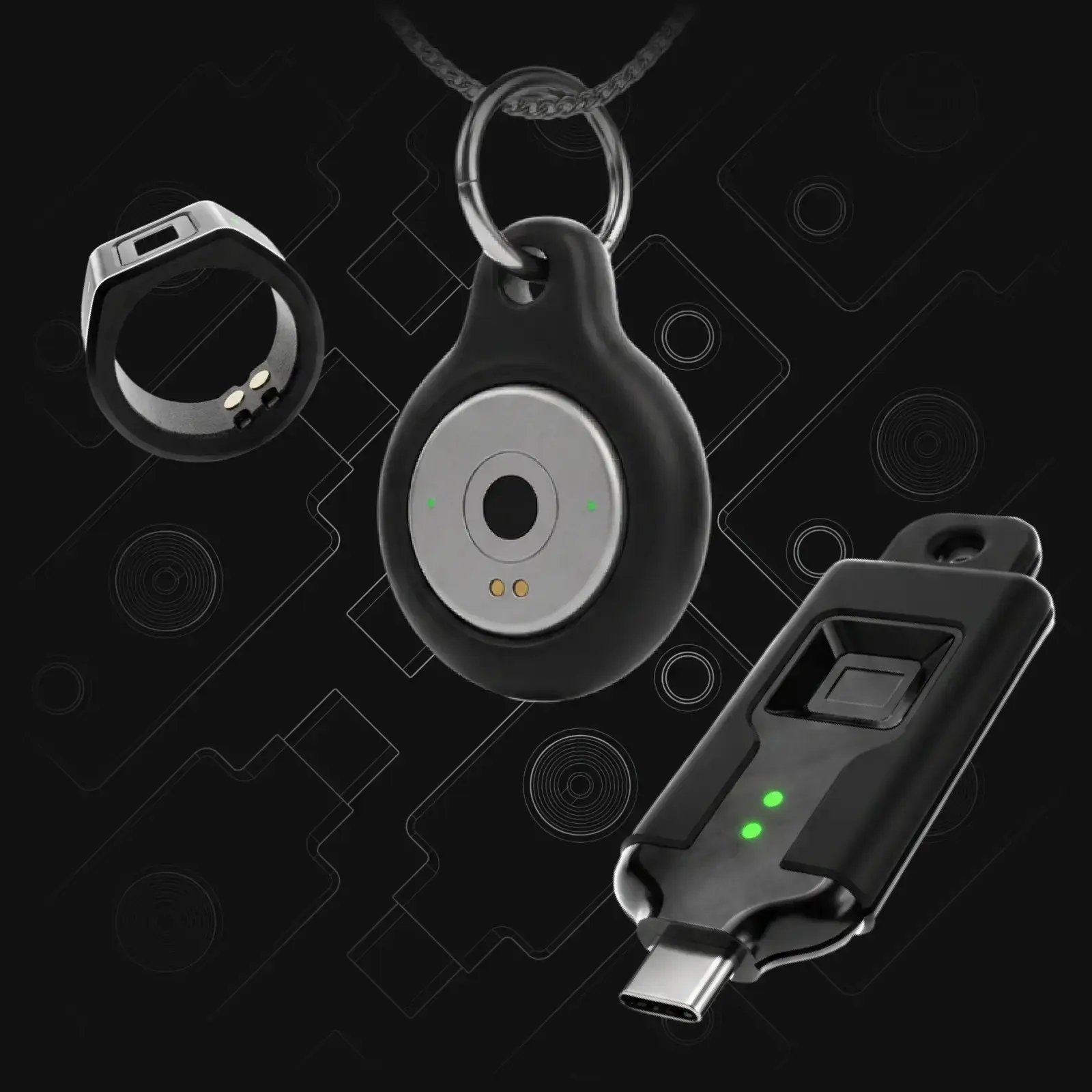
TokenCore™ Wearable ring, Node in its key fob and Portable security key
login.yourcompany.com

Single sign-on

Sign in to your workspace

Continue with

  • Microsoft Entra ID
  • Okta
  • Cisco Duo
Security key
Fingerprint matched on the device Phishing-resistant FIDO2 sign-in

Works with the identity platforms you already run

Okta
duo-white-1
CyberArk
OneLogin
Okta
duo-white-1
CyberArk
OneLogin

How It Fits

Where TokenCore™ Fits

TokenCore™ doesn't replace your identity tools. It adds a stronger sign-in to the ones you already run, with no drivers, agents or middleware to install on computers.

  1. Your people

    • Employees
    • Contractors
    • Admins
  2. TokenCore™

    • Fingerprint matched on the device
    • FIDO2 security key

    In Front of Your Identity Provider

    Users sign in through Entra, Okta, Ping or Duo as they do today. TokenCore™ checks their fingerprint before the login goes through.

  3. SSO + IAM

    • Microsoft Entra ID
    • Okta
    • Ping Identity
    • Cisco Duo

    Users, groups and policies stay as they are

    TokenCore™ registered as a FIDO2 key

    Registered Like Any Security Key

    IT adds TokenCore™ as a FIDO2 security key, so existing users, groups, policies and apps stay where they are.

  4. PAM

    • CyberArk
    • Delinea

    Vault access and privilege elevation

    TokenCore™ fingerprint check on vault and elevation

    Guarding Admin Access Too

    When an admin opens the PAM vault or elevates privileges, the same fingerprint check is required.

  5. Apps and systems

    • SaaS apps
    • Servers
    • Privileged systems

No drivers, agents or middleware to install on computers

SSO

Single Sign-On (SSO)

SSO means one login opens every app. That makes the SSO login the one attackers target, so it should be phishing-resistant.

Microsoft Entra ID

Enable the passkey (FIDO2) authentication method and restrict it to TokenCore™ with an AAGUID allow list. Then use Conditional Access to require phishing-resistant MFA for admins or all users.

Okta

Add TokenCore™ as a FIDO2 (WebAuthn) authenticator in Okta. Then set authentication policies to require phishing-resistant factors for the groups or apps you choose.

Ping Identity

Enable FIDO2 security keys in your PingOne MFA policy. Users register TokenCore™ once, and Ping prompts for it at sign-in.

Cisco Duo

Duo supports security keys (WebAuthn), so TokenCore™ works as a Duo hardware token wherever Duo protects a login. See how TokenCore™ works with Cisco Duo.

IAM

Identity and Access Management (IAM)

Your IT team runs the whole TokenCore™ lifecycle in the tools it already uses: enroll a user, recover access, replace a lost device and revoke access.

Revoke the credential in your identity provider and access ends immediately. It only exists on one device.

Credential lifecycle

In your identity provider
  1. 01 Enroll a user Register their TokenCore™ device as a security key
  2. 02 Recover access Follow your usual recovery process
  3. 03 Replace a lost device Enroll the new one, remove the old one
  4. 04 Revoke access The credential stops working, on its one device

Access ends immediately

PAM

Privileged Access Management (PAM)

Admins are the small group of users who can reach everything, so their logins are the biggest target. With TokenCore™, opening the vault or elevating privileges needs a fingerprint on a device that's physically present, not a password that could be stolen. Every privileged session is tied to a biometrically verified, physically present individual.

CyberArk

CyberArk Identity supports FIDO2 security keys. Use TokenCore™ as the factor for vault access and privilege elevation.

Delinea

Delinea is one of the platforms TokenCore™ works with. Talk to our team about how it fits your Delinea setup.

Integrations

Supported Platforms

Each platform below works with TokenCore™ as a FIDO2 security key. See all integrations.

Platform Type How TokenCore™ Connects Setup Guide
Microsoft Entra ID
SSO / IdP
FIDO2 security key
Okta
SSO / IdP
FIDO2 security key
On request
Ping Identity
SSO / IdP
FIDO2 security key
Cisco Duo
SSO / MFA
FIDO2 security key
CyberArk
PAM
FIDO2 security key
On request
Delinea
PAM
To be confirmed
On request
ForgeRock
IdP
FIDO2 security key
On request
OneLogin
SSO / IdP
FIDO2 security key
JumpCloud
SSO / IdP
FIDO2 security key
Auth0
IdP
FIDO2 security key
AWS IAM Identity Center
SSO
FIDO2 security key

Individuals

For Personal Use

The same device works on your personal accounts. If you sign in with Google, Microsoft or Apple, add TokenCore™ as a security key and it protects every site you log into with that account. Read more for individuals.

node-keychain
Identity Verified
  • Google
  • Microsoft
  • Apple
Security key Added to your accounts

FAQs

Frequently Asked Questions

Do we need to replace our identity provider?

No. TokenCore™ registers as a FIDO2 security key in Entra, Okta, Ping or Duo. Your users, apps and policies stay as they are, with no drivers or middleware to install.

Does TokenCore™ work with Duo?

Yes. Duo supports security keys (WebAuthn), so TokenCore™ works wherever Duo protects a login. See how TokenCore™ works with Cisco Duo.

How do we restrict sign-in to TokenCore™ only?

Add TokenCore™'s AAGUID to your identity provider's allow list. Other authenticators are then refused, so only TokenCore™ devices can complete the sign-in.

What happens if a device is lost?

It can't be used without the owner's fingerprint. Revoke its credential in your identity provider, and access ends immediately. Then enroll a replacement device for that user.

Get Started

Make Identity Absolute

Get started with TokenCore™

See how TokenCore™ fits your SSO, IAM and PAM stack in a 30-minute call.